
GSoC update: Reverse Geotagging widget is ready!
Hello everyone,
I'm very happy to announce you that the reverse geotagging widget is finished! This was the first part and maybe the most important part of my project in this year Google Summer of Code, so I'm glad to see it working. The reverse geotagging widget will be included in kipi-plugins 2.0 release which should be around december 2010. Also, I would like to mention that the world map, the image list and the other widgets(except Reverse Geotagging widget of course) from Geolocation widget are the work of Michael G. Hansen(my GSoC mentor).
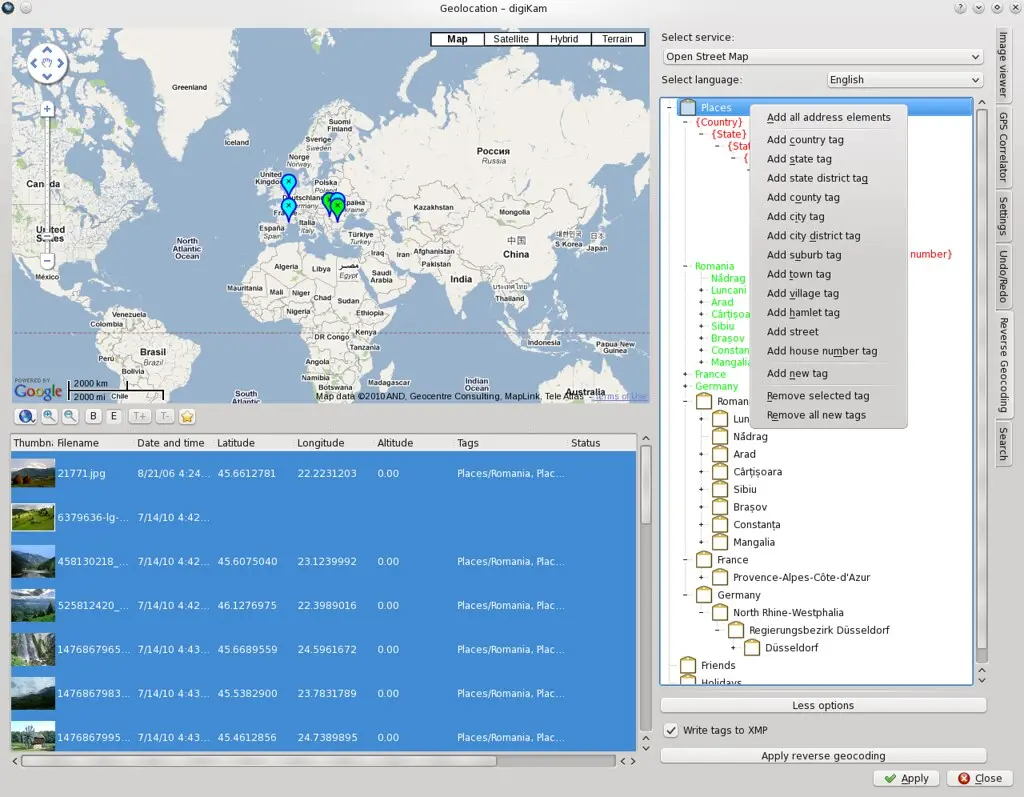
Now, perhaps some of you will ask: "Ok, but what is reverse geotagging?" Well, it's a process that reads the GPS coordinate inside an image and then tags it with address elements(country, city, street...).
Maybe you will still ask "But why is reverse geotagging widget helping me?" If we think at the fact that most people tag their images with location tags(Places/Spain, Holidays/France/Paris), then reverse geotagging widget is very useful because it helps you save many time when you have to tag lots of images. For example, think that you've just came from an Eurotrip and you want to show your friends the pictures taken on Champs-Élysées in Paris or the ones taken in Barcelona. Of course, you can search in all the new photos and tag them manually, but if you have hundreds or thousands of them it would take some time. The solution comes from the reverse geotagging widget, which automatically tags all your photos(that contains GPS coordinates) with location tags, using just a few clicks.
Before showing you the widget I want to tell you that sometimes the results will not be complete. For example, let's say that you've made a photo in Romania, Constanta city, Mamaia boulevard. If you reverse geotag this photo, you will see that was tagged only with "Romania/Constanta" instead of "Romania/Constanta/Mamaia". This is because the backend services haven't covered yet all the globe with all the address elements in their database. The good part in this is that you can help them quicken the globe covering by donating money or involving directly in their work.
Now, let's speak about this widget. As I said earlier, you can choose where your data will come from. There are 2 backend services: Open Street Map and Geonames. My opinion is to try them both, because they provide different types of results. Retrieving the tags in your commomn language is also possible, but take in consideration that will not always work. From my tests, I've seen that the country tag is translated in almost every language. If an address elements doesn't provide translation, it will be displayed in English.
You will also have the tag tree from digiKam, where you will tell the widget where to put the new tags. I've written a tutorial in wiki about how to use it here.
If you want to, you can add your tags image metadata too. I've chosen only XMP and no IPTC because it doesn't supports special characters(just ASCII code).
If you made an operation in the tag tree and want to undo it, you have the Undo/Redo widget developed by Michael G. Hansen the gives you the possibility to undo and redo each operation you made in Geolocation widget.
Ok, now let's see if this works. I put here two screenshots:one with the widget and the new tags and one with the tags added in digikam.In the first screenshot, for the ones of you that haven't looked in wiki to see detailed explanations, the red tags are control tags that tell the widget where to put the new tags, the green tags are tags that will be deleted once you close the Geolocation widget and the rest of tags are tags from digikam. In the second screenshot is a proof that the code works and adds properly the tags in digiKam.
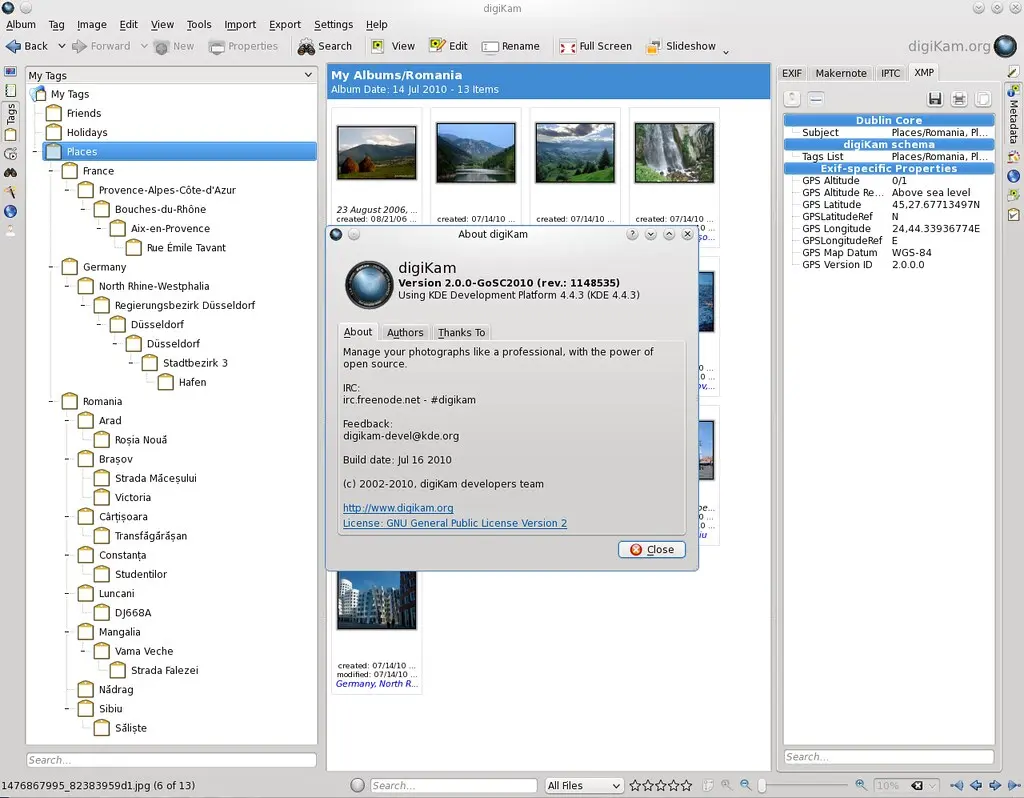
At the end, I want to special thank Michael G. Hansen for proper mentoring and helping me finish this widget.
