After one month since 3.0.0 release, digiKam team is proud to announce the digiKam Software Collection 3.1.0, as bug-fixes release. digiKam 3.x versions include GoSC 2012 projects listed here.
With this release several internal patches have been applied to increase source code stability. digiKam team has used Coverity SCAN tool to parse whole implementation and fix in-deep bugs. Also, MAC-OSX support have been improved and crashes under this platform have been hacked.
For this project, we'll use a photo of the famous Sagrada Familia cathedral in Barcelona, Spain. The photo was taken with a Canon PowerShot S90 camera, and the RAW file exhibits several obvious flaws, including visible barrel distortion, underexposed areas, and noise. In other words, this particular RAW file is perfect for tweaking in digiKam.
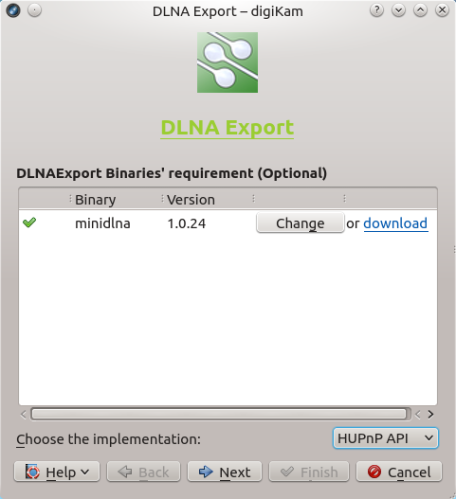
Need to quickly push photos in digiKam to a device on the same network? Provided the device supports DLNA, you can do this using the DLNAExport Kipi plugin. Choose Export ? Export via DLNA to open the DLNA Export wizard. From the Choose the implementation drop-down list, select either HUPnP API or miniDLNA. Both options have their advantages and drawbacks.
After one summer of active development with Google Summer of Code 2012 students, and 4 pre-release, digiKam team is proud to announce the final release of digiKam Software Collection 3.0.0.
This version include GoSC 2012 projects listed here.
While digiKam is first and foremost an application for processing and organizing digital photos, it also features tools for working with film negatives.
To calibrate a monitor and generate a color profile for it on Linux, you need two things: a colorimeter and color profiling software. High-quality professional colorimeters tend to be rather expensive, but you can use the excellent open source ColorHUG device instead. When it comes to calibration and profiling, the displaycalGUI software is the perfect software for the job. It provides a graphical user interface to the display calibration and profiling tools of the Argyll CMS open source color management system.
Using commands under the Import menu, you can pull photos from a variety of sources, including remote servers. The latter functionality in digiKam is provided through the KioExportImport Kipi plugin which supports common protocols like FTP, SSH, and SMB.
After one summer of active development with Google Summer of Code 2012 students, and 3 beta releases, digiKam team is proud to announce the release candidate of digiKam Software Collection 3.0.0.
This version is currently under development, following GoSC 2012 projects listed here.
While digiKam can't handle Adobe Photoshop curve presets directly, the application supports curves in the GIMP-compatible CRV format. So if you want to use Adobe Photoshop curve presets with digiKam, you have to convert them into .crv files — and the acv2gimp.py Python script can help you with that. Continue to read