Five Quick digiKam Tricks
A handful of quick digiKam tips and trips for your perusal.

A handful of quick digiKam tips and trips for your perusal.
Building digiKam for dummies on Ubuntu.
Updated according the latest, input, feedback and knowledge
about the current process per Sept 17, 2011.
The following guide is intended for Ubuntu users with no
experience in compiling software from source. However,
I provide links to instructions for other platforms than
Ubuntu.
IMPORTANT NOTE:
This guide has been tested for Ubuntu 11.04.
It has been verified that this is not going to work, if you are
using Ubuntu prior to 11.04, due to inavailability of some
required dependencies.
Dear all digiKam fans and users!
In order to fix this issue from KDE bugzilla, digiKam 2.1.1 have been just released.
digiKam software collection tarball can be downloaded from SourceForge Repository
Happy digiKam...
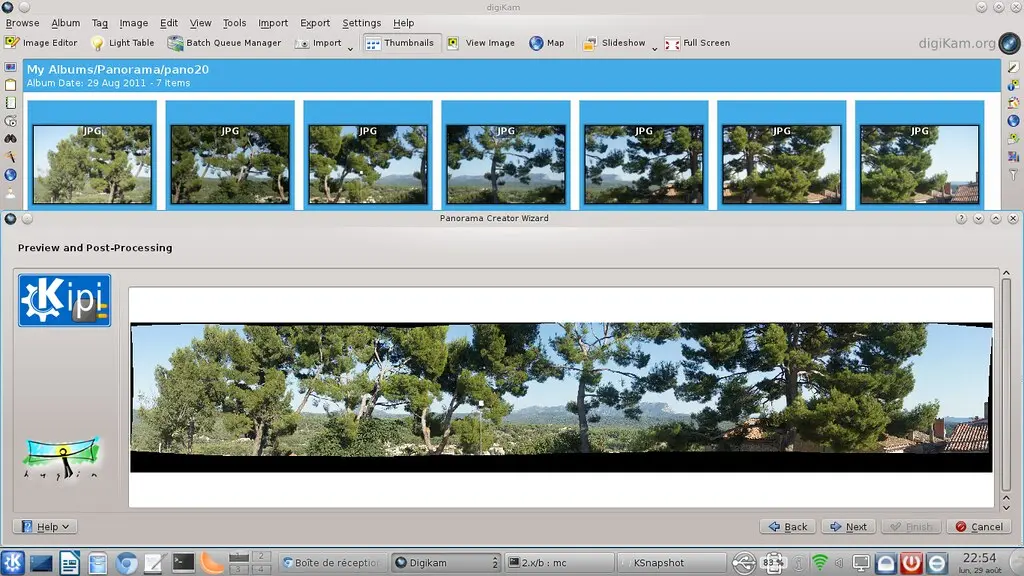
Read more →digikam 2.1 has been released a few days ago with many new features and improvements, one of the most exciting tools in this release is the panorama tool. Which is simple and quite effective.
Select the images that you want to stitch and go to tools> stitch images into a panorama( Continue to read...)

Dear all digiKam fans and users!
After one month of development, digiKam team is proud to announce the digiKam Software Collection 2.1.0 as bug-fixes release, including a total of 53 fixed bugs.
Close companion Kipi-plugins is released along with digiKam 2.1.0. This release features a new tool ready for production coming from Google Summer of Code 2011 project dedicated to stitch photos as panorama, and 10 bug-fixes.

As usual, digiKam software collection tarball can be downloaded from SourceForge Repository
Read more →The Focal Length Analyzer is a nifty little Bash script that pulls focal length data from digiKam’s database back end and generates nice graphs based on the extracted data.
Read more →digiKam supports an impressive range of file formats, so you can use the application to handle RAW files, movies and everything in between. But what if you want to explicitly exclude a specific type of files? digiKam offers a simple solution for that.
Read more →As the number version suggests, this is a minor release which features a handful of tweaks and corrections as well as improved compatibility with the Cool Reader app for Android.
Although attention in this release was focused on tweaks and fixes, the book includes the following new material:

Dear all digiKam fans and users!
digiKam team is proud to announce the digiKam Software Collection 2.0.0!
The road to version 2.0.0 took more than a year of heavy development. The team proudly announces the first release of the new generation of digiKam. This version features long awaited face detection and recognition, image versioning support, XMP metadata sidecar files support, big improvements in tagging and marking photos, reversed geo-tagging and many other improvements, including a total of 236 fixed bugs.
Read more →One of digiKam’s lesser known features is the ability to link scripts to notifications. At first sight, this may seem like a rather obscure functionality, but it can be put to some clever uses. Say, you want to keep a portfolio of selected photos on a mobile device. Resizing multiple photos to a specified size to make it easier to view them on the mobile device and transferring the processed photos from digiKam to the mobile device manually is not very practical. And this is where the ability to trigger scripts via notifications can come in handy. You can attach a simple Bash script to the Batch queue completed notification, so it’s triggered automatically when the Batch Queue Manager tool is done processing photos.
Read more →