If you want to install digiKam on Windows, you have two options: you can either compile the application from the source code or you can use the KDE Windows installer. The latter approach is by far the easiest one, but there is a drawback: the installer usually includes an older version of digiKam. If you can live with that, and you don’t feel like getting your hands dirty with compiling digiKam from the source, then the KDE installer is the way to go. Continue to read
While you can start using digiKam without tweaking its settings, you might want to spend a few minutes modifying the application’s default configuration to make it work your way. digiKam features dozens of settings, and which ones you want to adjust is up to you. Here are a few examples to get you started. Continue to read
Don't fancy digiKam’s default splash screen? No problem, you can easily replace it with your own photo. First off, you need to prepare your own photo for use in the splash screen. To do this, use an image editing application like the GIMP to resize the photo you want to 500×307 pixels. Save the resized image in the PNG format. Next, grab the splash-digikam.svgz file from digiKam's source code repository and open the downloaded file in the Inkscape vector graphics editor. Continue to read
The life expectancy of a DSLR camera is usually measured in shutter actuations. For example, Nikon D5000 is good for about 100,000 shutter clicks. That doesn’t mean that your camera dies the day it exceeds its shutter actuation limit, but the shutter count provides a good indication of the camera’s condition.
By default, digiKam uses SQLite as its back-end for storing important metadata and thumbnails. But the photo management application also provides support for the popular MySQL database engine, and it comes with a database migration tool that can help you to move your data from SQLite to MySQL. Continue to read
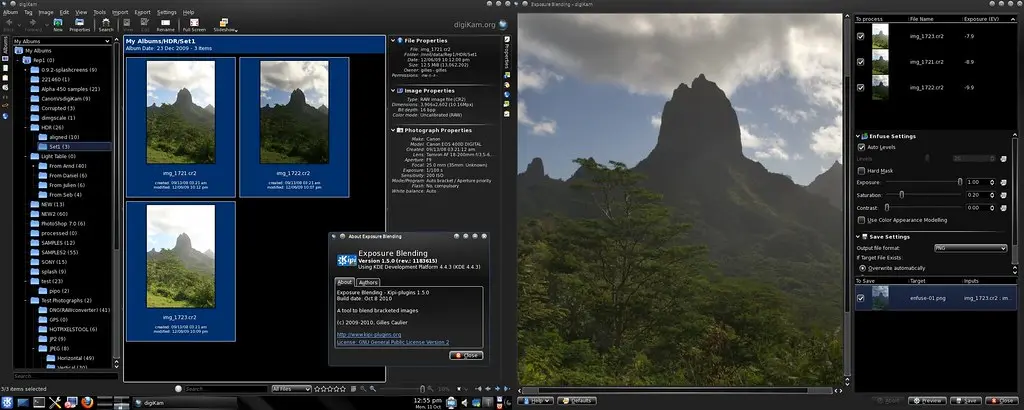
digiKam team is proud to announce digiKam 1.5.0 release!
digiKam tarball can be downloaded from SourceForge at this url
See the list of new features below and bug-fixes coming with this release since 1.4.0
Enjoy digiKam.
NEW FEATURES:
General : Fix compilation under windows with TDM-GCC and MSVC compilers. General : Including LensFun library source code as 3rd-party component, especially for windows target where this library is not available. Image Editor : Improvement of algorithm to convert 8 bits image to 16 and limit histogram holes during conversion.
Last week, from 27th to 29th August, developers of KDE Imaging group met for their third coding sprint organized by digiKam lead developer, in his hometown, the beautiful southern French city Aix-en-Provence. The time was shortly after the end of Google Summer of Code, in which digiKam participated this year with three students. It was therefore a perfect timing for us GSoC students to get to know our mentors in person and get to work with them side-by-side.
Lens distortion is a fact of life. You can mitigate this problem, but you can’t avoid it completely (unless you are willing to invest in seriously expensive professional-grade lenses, that is). Fortunately, digiKam provides a set of tools that can help you to fix lens distortion with relative ease. In fact, the application sports the Auto-Correction feature that attempts to fix lens distortion with a minimum of tweaking. Continue to read
digiKam team is proud to announce Kipi-plugins 1.4.0 !
kipi-plugins tarball can be downloaded from SourceForge at this url
See below the list of new features and bugs-fix coming with this release:
BUGFIXES FROM KDE BUGZILLA:
001 ==> IpodExport : 240469 : IpodExport fails to build with glib >= 2.25. 002 ==> MetadataEdit : 242624 : Wrong IPTC hyperlink. 003 ==> General : 239841 : I18n bug - missing extraction of messages in expoblending, flickrexport, metadataedit, … 004 ==> GPSSync : 246266 : Search for location when adding geo coordinates. 005 ==> PicasaWebExport : 247106 : Google picassa plugin does not work anymore since google changed parts of the interface. 006 ==> GPSSync : 246897 : GPSSync bad coordinate rounding.